The Complete Guide to Optimizing Your Medicare Agents Hub Listing

-
July 8, 2026
Getting listed on Medicare Agents Hub is step one. Getting the most out of your listing is where the real results come from. The agents who consistently outperform their peers aren't doing anything secret. They're working through the tools and features the platform already provides. Here's how to do the same.
The short version: Finish the success checklist, get Google reviews on your listing, learn how city and ZIP rankings actually work, respond to inquiries in minutes, and once you've sold 3 policies, start adding locations. That's the whole playbook.
Complete the Success Checklist
Medicare Agents Hub provides every agent with a built-in success checklist inside their dashboard, and the agents who work through it see noticeably better results. It walks you through everything that makes a listing perform:
- Uploading a high-quality professional headshot
- Customizing your bio to speak directly to the seniors you serve
- Reviewing your licensed states and lines of business
- Embedding a marketing video on your profile
- Adding your years of experience
- Connecting your Google reviews to display on your listing
- Checking your text notification settings
- Reviewing your mileage radius preferences
- Opting into bonus leads
- Making sure your contact info and location are accurate
There's also a complementary marketing section that most agents overlook. It prompts you to add your Medicare Agents Hub badge to your website, share your listing on social media, publish a guest article on the platform, and add your personal QR code to your printed marketing materials. These are small steps, but each one creates another path for seniors to find you.
The agents who treat this checklist as a punch list rather than a suggestion box are the ones writing the glowing reviews about lead quality. A complete profile with a professional photo, a compelling bio, a marketing video, and a stack of Google reviews will outperform a bare-bones listing every single time.
Collect and Display Reviews
Paid agents can display their Google reviews directly on their listing. When a senior is deciding between three agents in their ZIP code, the one with 15 genuine reviews is more likely to be chosen than the one with none.
After you help a client with their enrollment, ask them to leave a Google review. It takes them two minutes and it pays dividends for you all year long. The success checklist even prompts you to mark inquiries as "Policy Sold" when you close, which feeds back into the platform's performance tracking and helps us improve lead delivery for everyone.
Reviews are searchable, visible social proof that works for you around the clock. Seniors who see real testimonials from real clients are far more likely to reach out.
Understand How Rankings Work
Reviews help build trust, but the agents getting the most leads are the ones ranking #1 in their cities and ZIP codes. Medicare Agents Hub is completely transparent about how rankings are determined, and the factors are almost entirely in your control.
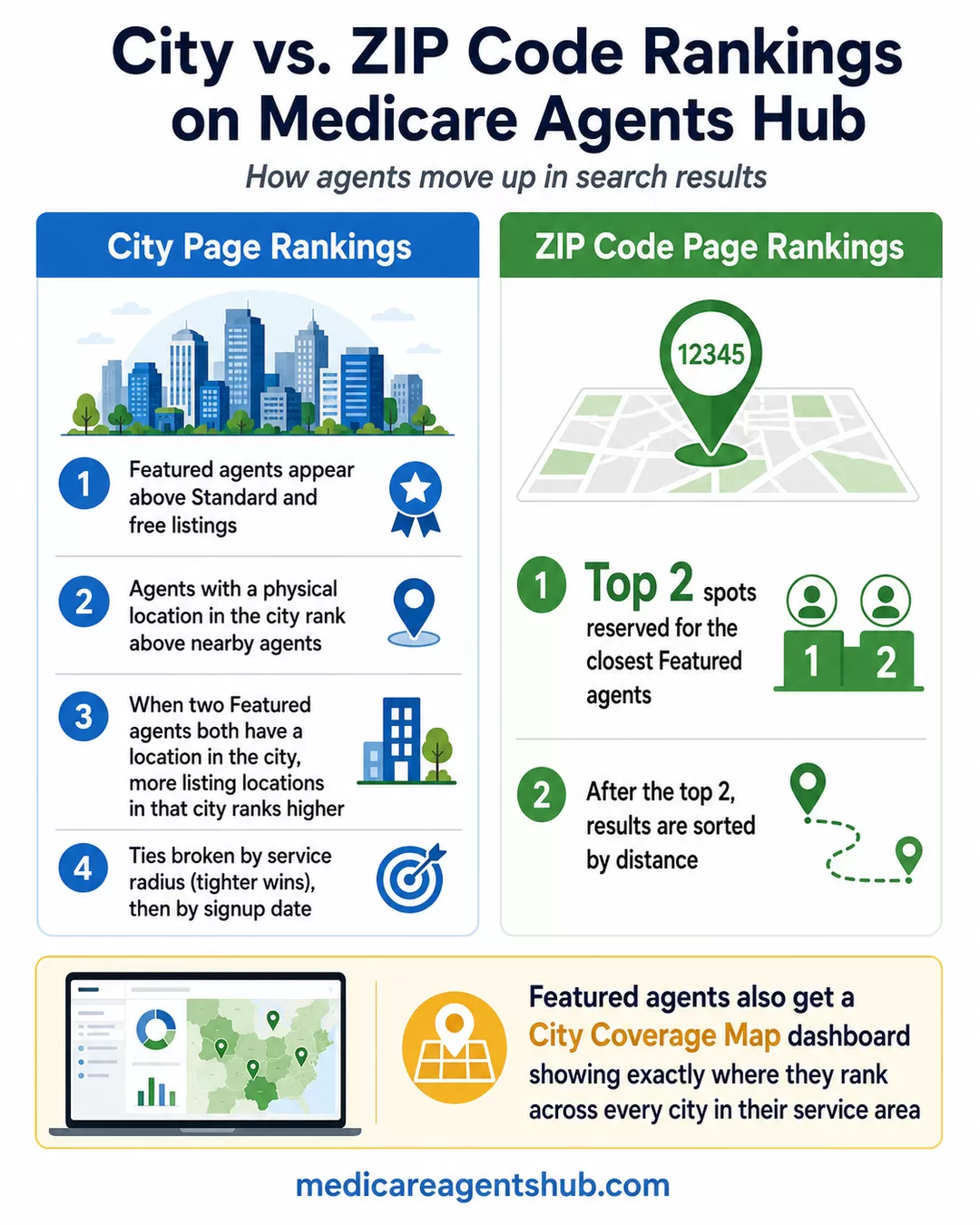
City Page Rankings
- Featured agents appear above Standard and free listings
- Agents with a physical location in the city rank above nearby agents
- If two Featured agents both have a location in the same city, the one with more listing locations in that city ranks higher
- Ties are broken by service radius (tighter wins), then by signup date
ZIP Code Page Rankings
- The top 2 spots are reserved for the closest Featured agents
- After that, it's sorted by distance
Featured agents also get a City Coverage Map inside their dashboard that shows exactly where they rank across every city in their service area. You can see which cities you're #1 in, where you're #2 or #3, and where there's an opportunity to move up. If you want to rank higher in a competitive city, you know exactly what to do: upgrade your tier, add a listing location in that market, or tighten your service radius.
Expand Into Multiple Locations
This is the real power move, and one that over 55 agents on the platform have already figured out. But you can't just buy your way in. Medicare Agents Hub uses a merit-based system: you need to have sold at least 3 policies through the platform before you can purchase your first additional location. After that, the number of locations you can add is tied directly to how many policies you've sold. Close 10 deals, you can have up to 10 listing locations. Close 30, you can have 30.
This gatekeeping mechanism means the agents expanding into multiple markets are proven closers, not tire-kickers throwing money at the wall. And it means those additional listings are being managed by agents who have demonstrated they can turn inquiries into meaningful relationships.
For agents who qualify, each additional location gives you Featured-level visibility in that market's search results. If you're licensed in three states and serve clients across a dozen metro areas, a single listing only captures a fraction of the seniors who might be looking for you. Expanding into additional locations means you show up when a senior in any of those markets searches for a Medicare agent near them.
Yes, this means some top-performing agents are spending well beyond $999 per year on the platform. They're doing it because the math works. Agents on the platform averaged roughly 38 inquiries per listing over our last 12-month reporting period (May 2025 through April 2026, pulled from our internal platform data). Cover more markets and that number climbs.
Respond Fast
Multiple agents in their reviews have mentioned that leads come with instant email and text notifications. The agents who follow up within minutes consistently close at higher rates than those who wait a day or two.
These seniors took the time to find you and fill out a contact form. They're ready to talk now, not next week. Every minute you wait is a minute they might spend looking at another agent's profile instead.
Upgrade Strategically
If you're getting results on your current tier, upgrading amplifies what's already working. The jump from free to Standard gets you into ZIP code lookups and displays your phone number. The jump from Standard to Featured more than doubles your average inquiries and gives you the placement positions that matter most in competitive local markets.
Upgrading buys visibility with seniors who are already searching for an agent in your area. The platform does the hard work of ranking in Google and driving traffic. Your tier determines how much of that traffic sees your profile first.
Where to start today
Log in and open your success checklist. Whatever's still unchecked is the fastest win sitting in front of you.
Then ask your last 3 clients for a Google review, and pull up your coverage map to see which cities you're losing. That's an afternoon of work, and it keeps paying all year.